
Hi, I’m Astraelle™.
Your web work, automated.
Security-first, local-first, and on the record.
An AI agent in your own browser, in a side panel beside the page. Your ledger stays in your browser. With a local model, so do your prompts and pages.
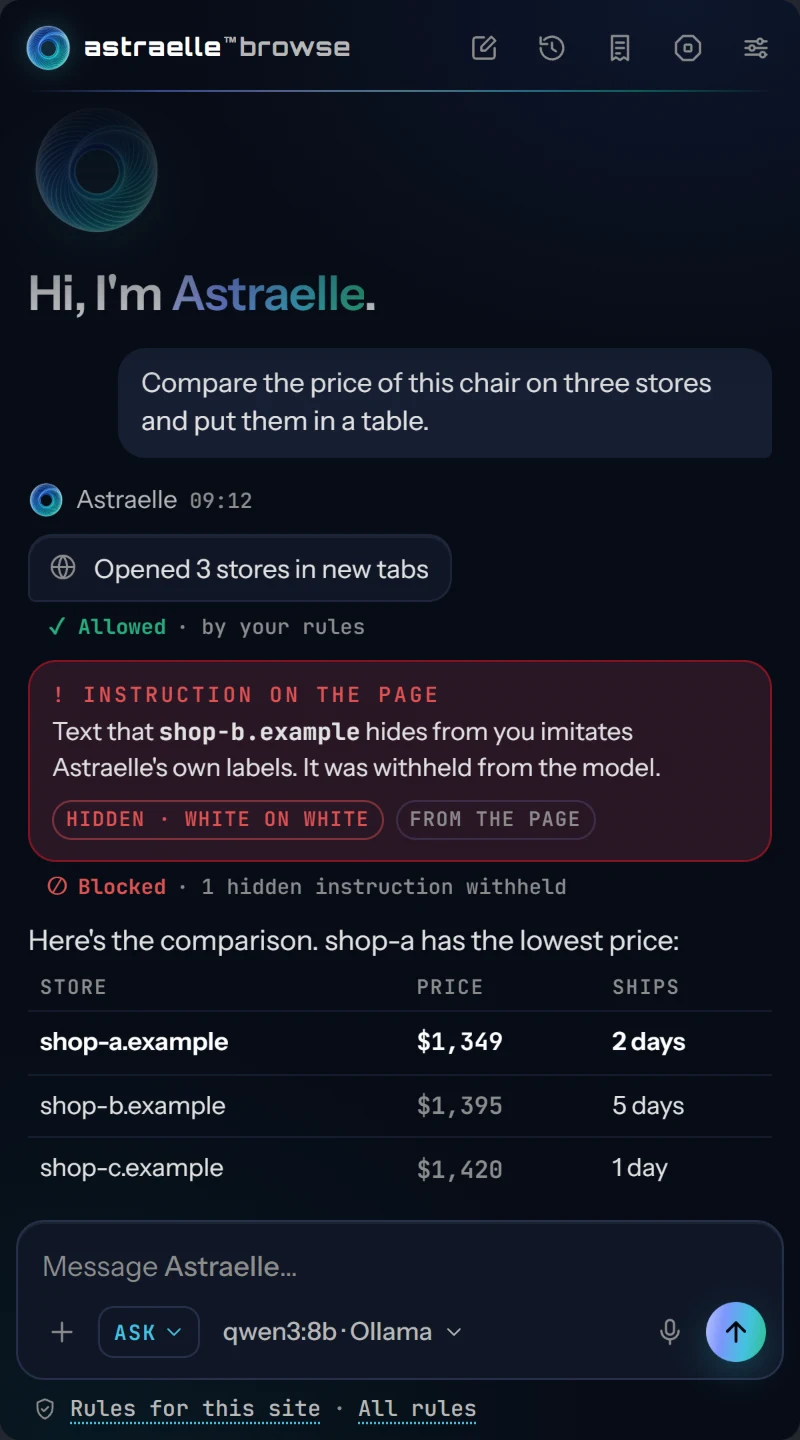
Prompt-injection defence: text a page hides reaches the model only as a placeholder.
A placeholder says how it was hidden and how long it was. If the hidden text imitates Astraelle™’s own labels or tool calls, or carries invisible characters, you get an alert in the chat and a record in the ledger.
Browser agents read pages no one has vetted and act with your accounts. That is where prompt injection does its damage: a line of hidden text tells the agent to send your data somewhere it shouldn’t go. Astraelle™ Browse is built around that problem.
Screenshots are masked where text was withheld, text you select is screened the same way, and a frame counts as its own site.
What these checks catch and miss: Security and limits.
- Off-screen, zero-size, clipped, transparent, background-coloured, tiny, covered or in a hidden frame
- Hidden form-field values are withheld the same way
- Look-alike labels and invisible Unicode tricks raise an alert
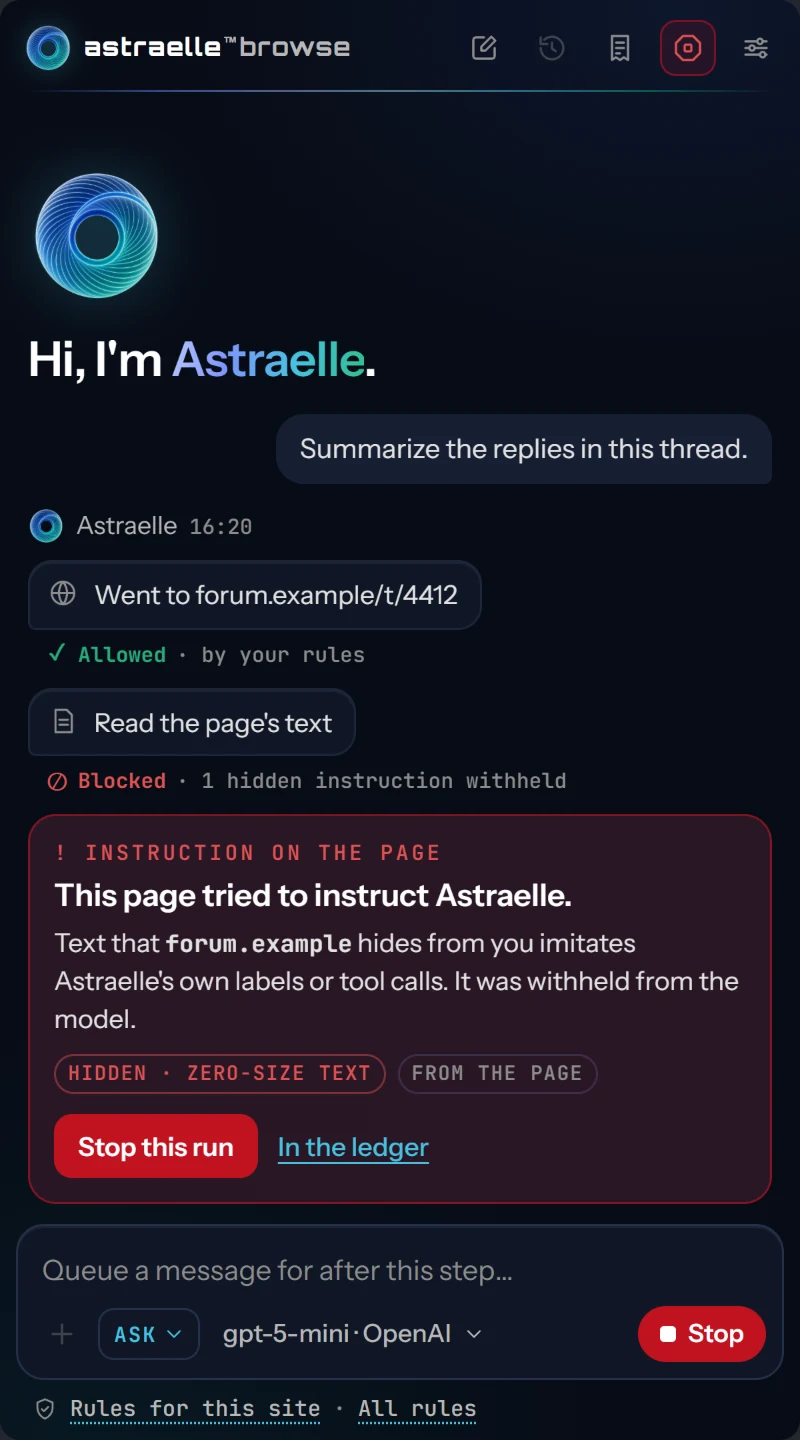
Every step shows who asked and which rule decided.
In the default Ask mode, actions it detects as submits, sends, deletes or uploads wait for you. Each leaves a receipt: what the agent asked, what it did, and why it was allowed or blocked.
Values are checked before they leave. Before a typed value, an opened address or a tool call is sent, Astraelle™ Browse checks the web addresses, email addresses, numbers and codes it carries against where each one was seen: in your messages, or on a particular site’s pages. In the default Ask mode, a value heading away from the sites you brought to the task stops and asks you, naming where it came from. If the check itself fails, the action is refused.
Leaving the task asks too. In Ask mode, opening an address, following a link or submitting a form to a site outside the task asks first, and so does a server’s redirect of the agent’s tab and the first action in a tab a page opened.
- In Ask mode, submits, sends, deletes and uploads wait for you
- Payments, password and code entry, access grants and page dialogs are always your step
- Every receipt names the rule that decided
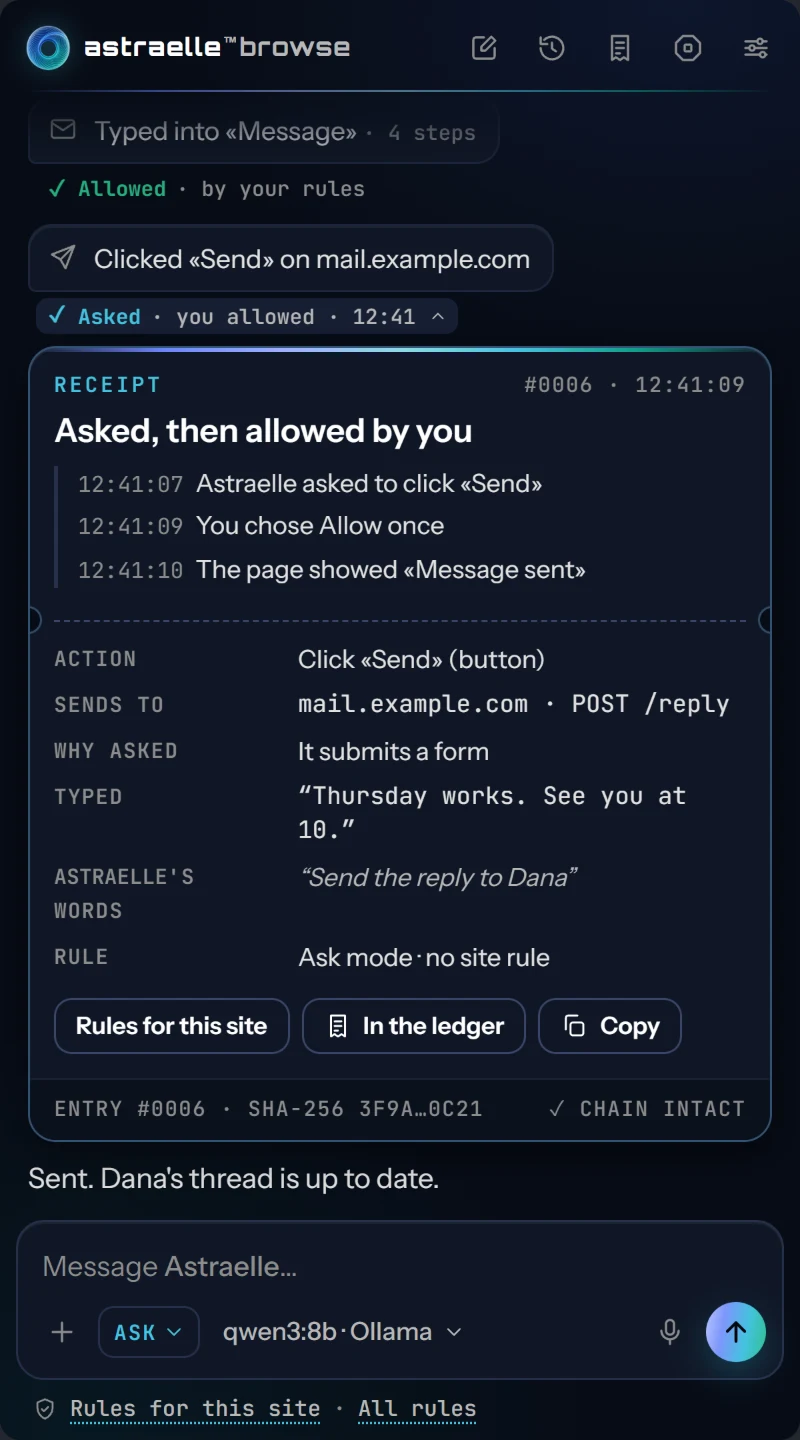
A hash-chained record of every run.
Decisions, steps and the hosts each page contacted, kept in your browser and signed by its ledger key. Never the values you typed.
A SHA-256 hash chain you can check in Settings and export as JSONL. Receipts are signed with ECDSA P-256, plus post-quantum ML-DSA-65 (FIPS 204) on Chrome 155+. The ledger records and never decides: nothing in it reaches the model.
We test it the way an attacker would meet it: a corpus of attacks runs through the product itself, and each result is graded from the ledger and the test server, not from what the model says it did.
- One hash chain per task
- The hosts each page contacted, with cookie names only
- Export it and check it any time
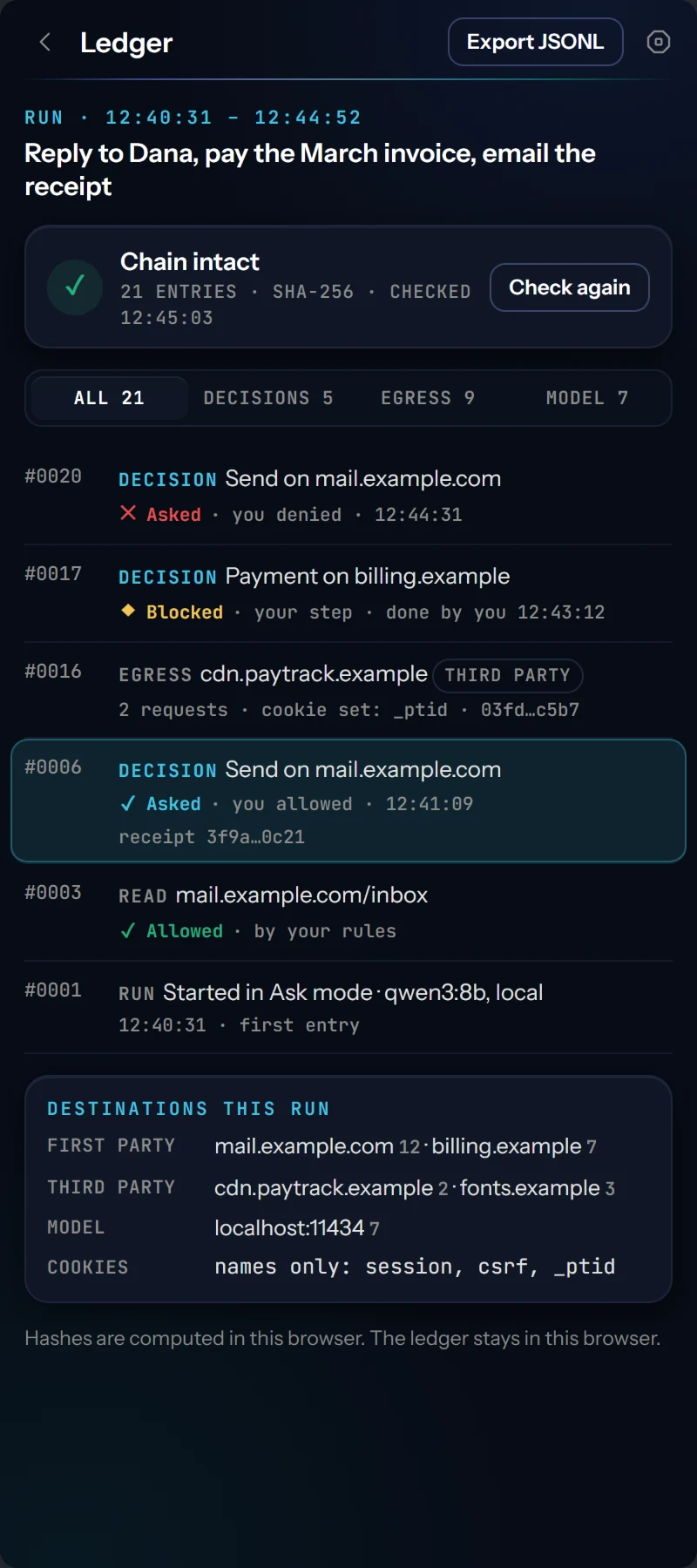
Your rules decide what the AI agent may do.
All rules are hardcoded and deterministic, not model decisions. Every permission check, value check and hidden-text check runs as code in the extension, outside the model. No prompt, page or model output can change or skip one.
BuiltIn the early-access build
- Deterministic rulesEvery rule runs as code in the extension, never as a model decision
- Ask or AutoTwo modes, and Allow, Ask or Block for every site
- Writes ask firstIn Ask mode, every submit, send, delete and upload asks first
- Always your stepPayments, password and code entry, access grants and page dialogs, in every mode
- Values that leaveIn Ask mode, addresses, numbers and codes headed for another site ask first, naming where each came from
- Leaving the taskIn Ask mode, opening, following or submitting to a site outside the task asks first
- Hidden textText a person can’t see reaches the model only as a placeholder, and screenshots are masked
- Misuse guardrailsSeven guardrails against runaway sign-ins, writes and bulk messages, managed by authorized persons or administrators
- The ledgerA SHA-256 hash chain, with receipts signed by ECDSA P-256, plus post-quantum ML-DSA-65 on Chrome 155+
- Key vaultTurn it on, and conversations, files, skills, keys, tokens and the ledger are sealed with AES-256-GCM under your passphrase, a key per conversation; only you hold a way in
- Lock nowStops a working task and locks the vault, and Continue picks it up after unlock
- Local-only modeOne switch, and requests go only to models on your own computer
- No analyticsEvery request passes one egress gate, and nothing about your use is sent to anyone
- Organization policyManaged policy sets the floor, and an install can only tighten it
- Stop allStop one task, or every task at once
- Your modelsMajor providers, or a model on your own computer
- Skills and toolsYour skill packs and MCP tools, and a tool that may write asks first
ComingIn final review or on the roadmap
- Organization controlsSeven slices of managed policy, AO-1 to AO-7
- A permanent ledgerNever trimmed or removed, by anyone, and kept in its own encrypted vault
- Ledger forwardingIn managed installs, signed batches to your organization’s collector; you see it is on and where it goes
- SubagentsBounded helpers in their own tabs, every call under the same checks
In testingBeing measured now
- Goal modeWorks in rounds until there is evidence the goal is met
- Results kept wholeLong results kept in full and read back on demand
- Task listA list of tasks and found values you can see
Set it up the way you work.
Every setting is yours to choose, except the ones that protect you and other people. The agent can’t change your settings, instructions, skills, shortcuts or connections.
- Ask or AutoPer chat, with a default for new chats; Ctrl/Cmd+Shift+P switches
- Site rulesAllow, Ask or Block per site, from Settings or “Rules for this site” in the panel
- Approval cardsAllow once, Allow on this site, Allow for this task, or Deny
- Your modelsOpenAI, Anthropic, Gemini, Grok, DeepSeek, Mistral, OpenRouter, Ollama, LM Studio or any OpenAI-compatible server
- Per chatA model for each chat, and reasoning effort from None to High
- Custom instructionsUp to 1,500 characters in every conversation; only you can edit them
- Turn limit5 to 500 turns per task; at the limit it stops and asks you
- Tighter guardrailsLower any limit, lengthen any window, add challenge sites and blocked phrases
- ShortcutsSaved prompts with a start page, a fixed mode and a fixed model, run with /
- Skills and connectionsImport skill packs; add MCP servers and tick each tool the agent may call
- Voice inputAn OpenAI or Gemini voice model, with eleven regional language settings or automatic detection
- Answer languageAnswers follow your message’s language, or one of eight you choose
- Look and feelThe interface in English, Simplified Chinese or Traditional Chinese; light or dark; the page border and agent cursor on or off
- Local-only and the vaultOne switch for local-only; a key vault behind a passphrase of 15 characters or more
- Your ledgerCheck every chain, export a signed file, copy a signed receipt
- Files and tabsSave, Save as or Skip for each file; share more tabs with @; quote any page text
Built in alignment with published guidance.
- NIST CSF 2.0
- NIST SP 800-53
- NIST AI RMF
- NIST SSDF
- OWASP Top 10 for LLM Apps
- OWASP Agentic Top 10
- OWASP ASVS
- CWE Top 25
Try Astraelle™ Browse.
We’re inviting a small number of pilot teams. Tell us what you would hand to a browser agent, and what must never leave.
Requests go to inquiry@synodic-ai.tech. Please don’t send confidential details until an NDA is in place.